case study / Zoho Inventory Implementation / Oklahoma City, Oklahoma

A Zoho Inventory migration in Oklahoma City revealed a hidden hack.

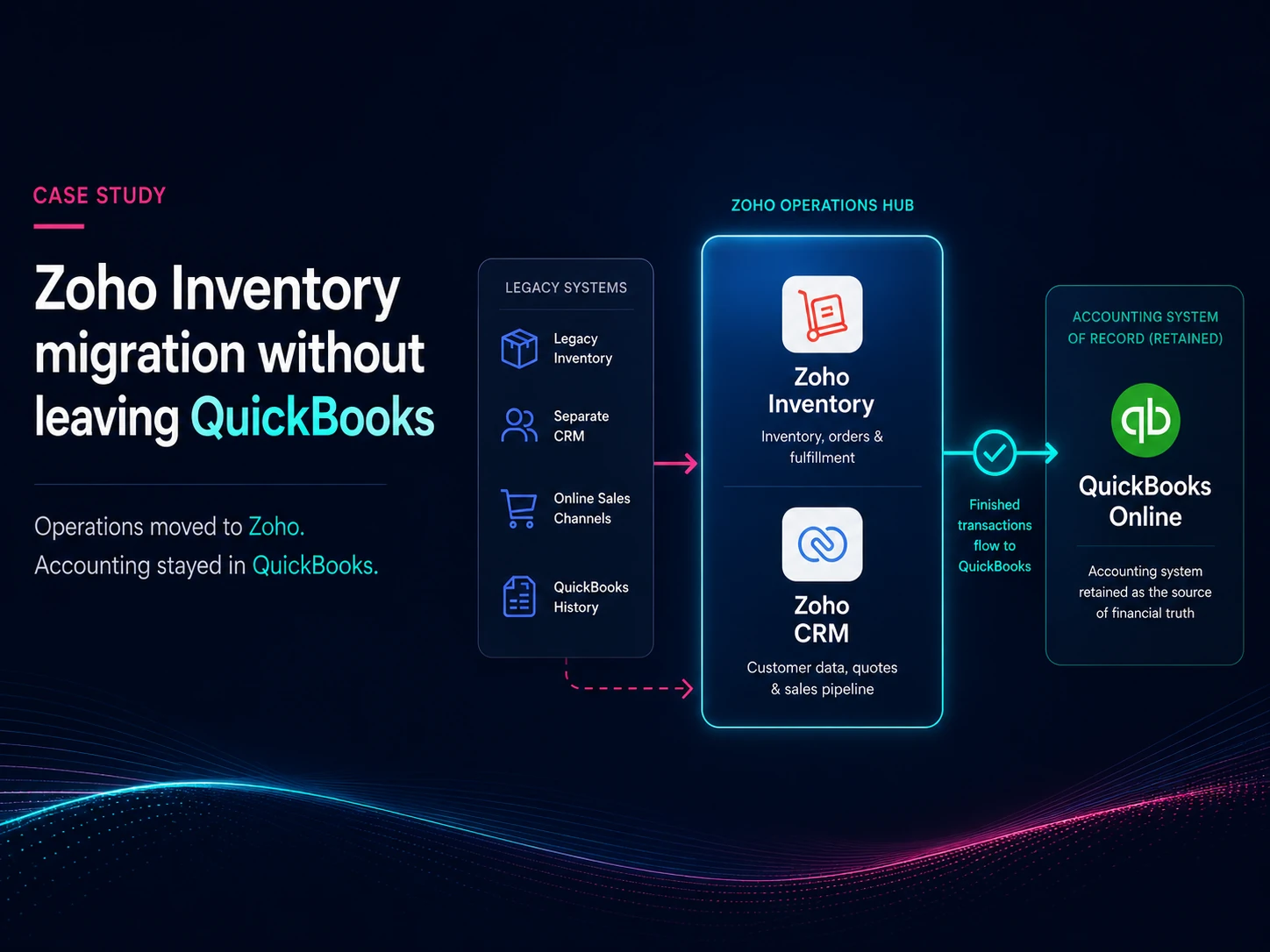
The client was running their operation across a standalone inventory system, a separate CRM, and several online sales channels — with years of accounting in QuickBooks. A standard migration would move accounting to Zoho Books, but that was out of scope.

Cheat code unlocked.

Oklahoma City Zoho Inventory and CRM migration case study

At a glance

Industry
Hardware
Location
Oklahoma City, Oklahoma
Year
2021
Engagement
Migration from a legacy inventory system and separate CRM onto Zoho One, with QuickBooks kept as the accounting system of record. Delivered with a partner firm.
Products
Zoho Inventory, Zoho Books, Zoho CRM, Zoho One, QuickBooks
Key takeaway
You don't have to choose between Zoho and QuickBooks. Zoho Inventory's native connector works even if you're only using Zoho Books.

Where they started.

The business sold across several channels at once — its own online storefronts, a marketplace, and direct sales — while keeping inventory in a standalone system, contacts in a separate CRM, and the accounting in QuickBooks, all separated. Each piece worked on its own. The cost lived in the seams: stock reconciled by hand, customer records in more than one place, and no single view of what was actually selling.

"It's complicated."

To complicate matters, the company both bought and sold the same kinds of equipment, often with the same companies on both sides — so a large share of its contacts were customers and vendors at once. It had years of accounting history in QuickBooks that the bookkeeper had no intention of leaving. And at the time — this was 2021 — Zoho's warehouse handling carried a hard limitation that shaped how stock could be organized.

The move itself brought over only the live business: open and outstanding transactions came into Zoho, while years of closed history were loaded into Zoho Analytics, where they stayed searchable for reference instead of becoming records the live system had to carry. Cutover ran off a single closeout window — clear open drafts and partial fulfillments, export each module in full, then load.
Connect Zoho Books to QuickBooks?

Yes, you can.

Zoho's apps are built to stand on their own, and that leads to a useful quirk in the finance suite. Zoho Inventory ships with a native QuickBooks Online connection — it can push finished invoices, bills, and their payments straight into QuickBooks. Zoho Books, being QuickBooks' direct competitor, has no such connection. But Books and Inventory run on the same underlying system; they are effectively two views of the same data. So a business that needs to keep QuickBooks can enable Inventory in a Zoho One account — even if you are not using it — and use that connection to feed finished transactions into QuickBooks.

The client had years of history in QuickBooks and a bookkeeper who wanted to stay there. Rather than force an accounting migration nobody wanted, the operation ran in Zoho while QuickBooks remained the system of record for pure accounting, fed by Inventory's connection. The client kept the books their accountant trusted and got the operational system the business needed — without having to choose between the two.

When is a customer also a vendor?

Like most accounting and inventory systems, Zoho treats a contact as either a customer or a vendor, not both. A company you only sell to fits cleanly. A brokerage, which both buys and sells from you, does not.

There is a solution. Keep two records — one customer, one vendor — and link them, with duplicate display names enabled so the same company name can sit on each side. That keeps receivables and payables straight and lets you offset what you owe against what you are owed.

The challenge was the external systems for online sales and shipping. It was necessary that those syncs respected the existing linked records rather than re-creating or duplicating them. Once a contact carries transactions it can't simply be deleted, so those records had to be treated as fixed points from the start.

The infamous bin limitation.

In 2021, Zoho Inventory warehouses could not be subdivided into bins. For a business holding many distinct, individually tracked units, that was a real constraint: there was no native way to record exactly where in a warehouse a given item sat, so stock organization had to be handled through other fields and conventions rather than the system's own structure. It was the kind of limitation you design around rather than wish away.

Where they landed.

On completion, the operation ran in Zoho while QuickBooks stayed the book of record. Inventory, orders, and customers lived in one place, sales from every channel flowed in with their source intact, and years of history stayed searchable in Zoho Analytics without weighing down the live system.

Unfortunately, the scope did not allow for benchmarking, so it's not possible to accurately state the efficiencies gained. However, common sense would suggest they are significant. At a minimum, an integrated platform provides a cross-function foundation for growth that an isolated system could never match.

A build like this is correct on the day it's handed over; staying correct depends on a disciplined team. The best results involve ongoing partnership and periodic maintenance. Delivered with a partner firm.

Running Zoho across inventory, sales, and accounting in Oklahoma or around the world? Let's talk.

Start a Conversation